

Every smartphone has a unique identity number that helps identify it on mobile networks. This number is called the IMEI number If you have ever wondered how to check IMEI number you are not alone Many users search for how to check IMEI number when buying a used phone checking warranty status or verifying if a device is original Knowing how to check IMEI number is very useful because it helps you confirm your phone’s authenticity and track it if it gets lost or stolen In this guide you will learn how to check IMEI number using several simple methods that work on almost every smartphone.
What is IMEI Number and Why It Is Important
Before learning how to check IMEI number it is important to understand what IMEI actually means IMEI stands for International Mobile Equipment Identity install It is a unique 15 digit number assigned to every mobile device.
The IMEI number helps mobile networks identify your device This means your phone can be recognized even if the SIM card changes If a phone is stolen the IMEI number can be blocked by the network so the phone cannot be used.
Reasons why people search for how to check IMEI number include verifying a new phone checking warranty, reporting a stolen phone or confirming whether a phone is original.
How to Check IMEI Number Using Dial Code
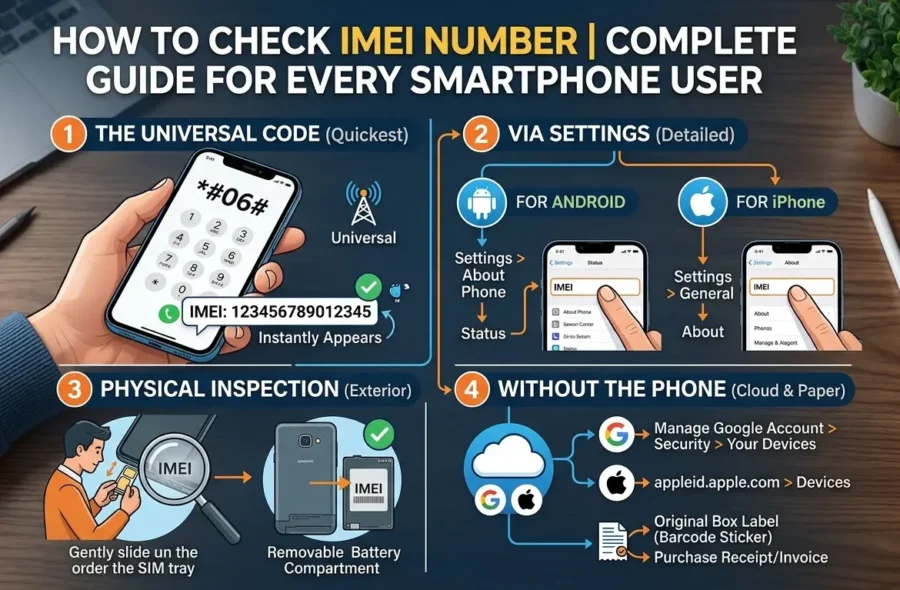
The easiest method for how to check IMEI number is by using a dial code this method works on almost every smartphone including Android and iPhone.
Steps to follow
1 Open the phone dialer on your device
2 Dial *#06#
3 As soon as you dial the code, the IMEI number will appear on your screen.
4 You can note the number or take a screenshot for reference
This is the fastest way when someone asks how to check IMEI number because it takes only a few seconds.
How to Check IMEI Number From Phone Settings
Another common method for how to check IMEI number is through the settings of your phone.
Steps for Android phones
1 Open the Settings app
2 Scroll down and tap About Phone
3 Look for Status or Phone Information
4 You will see the IMEI number listed there
Steps for iPhone
1 Open Settings
2 Tap General
3 Tap About
4 Scroll down to find the IMEI number.
If you want a permanent place to view the number this method of how to check IMEI number is very reliable.
How to Check IMEI Number on Phone Box
If you still have your phone box you can also learn how to check IMEI number directly from the packaging.
Most smartphone boxes have a sticker that contains information such as
IMEI number
Serial number
Model number
Barcode.
The IMEI printed on the box should match the IMEI inside your phone Many people use this method when verifying a newly purchased smartphone
How to Check IMEI Number Without Turning On the Phone
Sometimes your phone might not turn on In that case you may still want to know how to check IMEI number.
Here are some ways to
Check the phone box where the IMEI number is printed
Look at the SIM tray or back panel if the manufacturer prints IMEI there
Check your purchase invoice or warranty card
These options can help you find the IMEI number even if the device is not working.
How to Check IMEI Number for Dual SIM Phones!
Many modern smartphones support dual SIM cards if you are wondering how to check IMEI number on these phones, the process is almost the same.
Dual SIM phones usually have two IMEI numbers
IMEI 1 for SIM slot 1
IMEI 2 for SIM slot 2
When you dial *#06# both numbers will appear on the screen this allows networks to identify each SIM slot separately.
How to Use IMEI Number to Check Phone Authenticity
Once you know how to check IMEI number you can use it to verify if a phone is genuine.
You can search the IMEI number on official IMEI checking websites or manufacturer portals these services can show information like
Phone model
Warranty status
Activation date
Network compatibility
This is especially useful when buying a second hand smartphone.
How to Check IMEI Number for Lost or Stolen Phone
Learning how to check IMEI number is also important for security reasons If your phone is lost or stolen the IMEI number can help authorities track or block the device.
Steps you can take
Report the IMEI number to your mobile network provider
File a complaint with the police
Ask the network provider to block the IMEI
Once blocked the phone cannot connect to mobile networks making it useless for thieves.
Common Mistakes When Checking IMEI Number
When searching for how to check IMEI number people sometimes make small mistakes.
Some common mistakes include
Confusing IMEI with serial number
Entering the wrong digits while checking online
Not verifying that the IMEI on the box matches the phone
Always double check the number carefully because even one incorrect digit can give wrong results.
Final Thoughts on How to Check IMEI Number
Understanding how to check IMEI number is something every smartphone user should know It is one of the simplest ways to verify your phones identity and protect your device whether you use the dial code method phone settings or the box label each method makes it easy to find your IMEI knowing how to check IMEI number can help you confirm authenticity check warranty details and even secure your phone if it is lost.
If you are buying a new or used smartphone always take a moment to check the IMEI number it is a small step that can prevent many problems in the future.
FAQ About How to Check IMEI Number.
What is the easiest way to check IMEI number!
The easiest way for how to check IMEI number is dialing *#06# on your phone keypad.
Can I check IMEI number without SIM card?
Yes! You can still follow the same process for how to check IMEI number even if there is no SIM card inserted.
How many digits are in an IMEI number?
An IMEI number usually contains 15 digits that uniquely identify a mobile device.
Is it safe to share IMEI number!?
It is generally recommended not to publicly share your IMEI number because it is linked to your device identity.
Can IMEI number track a stolen phone!
Yes Authorities and mobile network providers can use the IMEI number to block or track a lost device.
Does every phone have an IMEI number!
Yes,Every smartphone has a unique IMEI number which can be found using methods explained in this guide on how to check IMEI number.